Clear calls from anywhere.
MuteX removes keyboards, fans, hum and floor noise from every microphone on your Windows PCs, so customers hear your people, front and centre.
- Every dialler, softphone and meeting app
- Runs on each PC, and the audio stays there
- Licensed per desk, shared across shifts
Windows 10 and 11Start your trial for ₹9 + GST

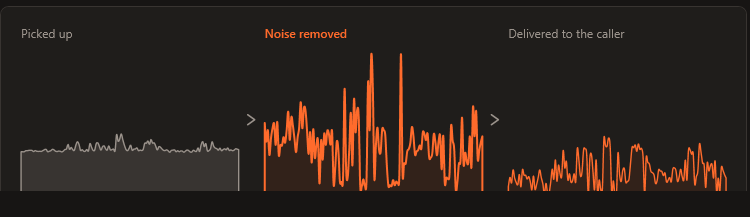
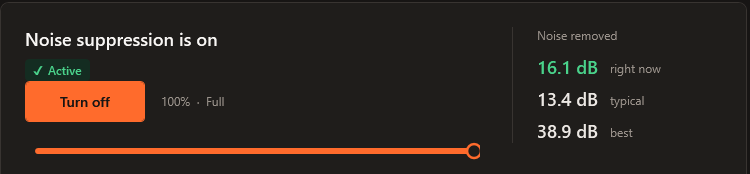
50.6 dB quieter between sentences, measured on this sample. The voice and floor are synthetic; the clean version comes from the real MuteX engine.
Built by Enser Communications Limited, an NSE Emerge-listed customer-communications company with 17+ years of running call floors. MuteX runs every day on Enser's own floors.
- ISO 9001:2015
- ISO 27001:2022
- SOC 2
- CMMI Level 5
Made for floors and teams. Ready for one PC too.
The customer hears the agent. Clearly.
On a busy floor, every call carries the room with it. MuteX cleans each agent's microphone before the dialler hears it.
- Works under every dialler and softphone that uses the Windows microphone, including browser-based CRM telephony.
- Agents keep their headsets and their desks exactly as they are.
- Licensed per desk: three shifts at one desk need one licence.
- Runs on the PCs you already have, from Intel Core 3rd generation.

Every meeting app gets the same clean voice.
Sales calls, client meetings and support from a home office, a café or an open-plan floor.
- Teams, Zoom, Google Meet and browser calls, all at once, from one install.
- The voice stays natural, and nearby conversation is turned down in your pauses.
- Licences for the whole team in one client portal, with GST invoices.

One installer. One licence per desk. Audio on the PC.
Built to pass a security review and roll out with the tools you already use.
- Silent install, and activation from the command line or a login script.
- Licences assigned, revoked and reassigned per PC in the client portal.
- Licence checks send the licence key, a hashed machine ID and the PC name. Call audio stays on the machine.
- Updates install between calls, or wait for your change window.

Clear calls from your own PC.
Working on your own? MuteX is the same software on one PC: install it, and every app gets your clean voice.
- Start with a trial on your own PC.
- Ready in about a minute on Windows 10 or 11.
- Move the licence when you change PCs.

It sits inside Windows, below every app.
MuteX is part of the Windows audio engine on each PC, at the microphone itself. Whatever app opens the microphone receives the cleaned voice, so every app is covered from the first call after installation.
The microphone you have
Headset, USB mic or a laptop's built-in array. It keeps its own name.
MuteX
A neural network removes the noise in real time, and a near-field gate turns nearby voices down in the speaker's pauses.
Every app on the PC
Install
One installer of about 40 MB, run by hand or pushed silently to every PC.
Activate
One licence key per PC, typed once or activated from a script.
Talk
Every call is cleaned from then on. If someone swaps headsets, MuteX follows the new one within seconds.
Easy for agents. Easy for IT.
Silent install
Push MuteX-Setup.exe /quiet /norestart with your deployment tool, or image PCs with MuteX and license them later.
Per desk, shared across shifts
A licence covers a PC, whoever sits at it. Morning, evening and night shifts at one desk need one licence.
Every licence in one place
Assign, revoke and reassign licences per PC in the client portal, renew by hand or with autopay, and download GST invoices.
Updates between calls
Each PC checks once a day, verifies the checksum and publisher, and installs only between calls. Pin updates to your change window if you prefer.
Calls always carry on
If a PC is offline, it keeps full noise cancellation for 7 days. Whatever the licence status, the microphone keeps working.
The PCs you already have
Tested on 2012-era office PCs: Intel Core 3rd generation or newer, 4 GB of RAM. About 30 ms of delay, too little to notice on a call.
Your audio stays on the PC.
MuteX cleans the microphone inside Windows on each PC, so call audio stays on the machine from start to finish. That keeps it simple for banking, insurance and collections floors, and for your security team.
- Where audio goes
- Into the Windows audio engine on the PC, then to your apps. That is the whole journey.
- What is sent
- At activation and once a day: the licence key, a hashed machine ID and the PC's name, to mutex.co.in over HTTPS.
- What is stored
- On the PC: a diagnostic log of timings and signal levels, and the licence details.
- Firewall
- One host, mutex.co.in on TCP 443.
- Who makes it
- Enser Communications Limited, Navi Mumbai: ISO 27001:2022 and SOC 2 certified.
What MuteX does, start to finish.
What it cleans, where it runs, which apps get the clean voice, and the 51 dB we measured on the real engine in a noisy home office.
- Keyboards, fans, traffic and hum, cleaned in real time.
- Nearby voices turned down in your pauses.
- Teams, Zoom, Google Meet, softphones and every app on the PC.
One licence per PC. Pick how long.
Every plan is the same software. A licence covers one PC across every shift, and prices are per licence, plus 18% GST, shown at checkout before you pay.
Trial · ₹9 + GST for 3 days
The full product on one PC, so you can hear the difference on your own calls.
1 Month
Month to month, the flexible choice.
- Noise cancellation in every app
- One PC, shared across shifts
- Client portal, updates and GST invoice
6 Months
Half a year, at a lower monthly rate.
- Noise cancellation in every app
- One PC, shared across shifts
- Client portal, updates and GST invoice
1 Year
The lowest monthly cost, for everyday use.
- Noise cancellation in every app
- One PC, shared across shifts
- Client portal, updates and GST invoice
Volume discount: 10% off from 11 licences · 20% off from 51 licences, applied automatically at checkout. More than 100 PCs? Talk to us about a team plan.
What each PC needs
- Windows
- Windows 10 (1903 or later) or Windows 11, 64-bit
- Processor
- Intel Core 3rd generation (2012) or newer, or AMD equivalent
- Memory
- 4 GB RAM
- Power plan
- Balanced (the Windows default) or High performance
- Microphone
- Any headset, USB or built-in mic running at 48 kHz
- Disk
- About 110 MB
- Network
- HTTPS to mutex.co.in, for licence and update checks
Sits under any app
"Verified" means tested with that application on Windows 10 and 11. Using a different dialler? Book a demo and we'll test it with yours.
Questions buyers ask
What is MuteX?
MuteX is AI noise-cancellation software for Windows PCs, made by Enser Communications Limited (India) for contact centres, BPOs and business teams. It runs inside the Windows audio system at the microphone, removes background noise such as keyboards, fans, hum and traffic in real time, turns nearby voices down in the speaker's pauses, and passes the clean audio to every app on the PC.
Is MuteX licensed per user or per PC?
Per PC. A licence covers one computer, whoever is using it, so shift teams that share a desk share its licence: three shifts at one desk need one licence. Adding desks needs more licences, and volume discounts apply automatically at checkout.
Does MuteX work with our dialler, softphone or CRM?
Yes, if it uses the Windows microphone. MuteX works below the application, so diallers, softphones, browser-based CRM telephony, Teams, Zoom, Google Meet and call-recording software all receive the cleaned audio, with no integration and no per-app setup. The X-Lite softphone and browser calls in Chrome and Edge are verified. Book a demo and we'll test it with your own dialler and headsets.
How is MuteX different from the noise suppression in Teams or Zoom?
Teams and Zoom each clean the audio inside their own app. MuteX works one step earlier, at the microphone in Windows, so every app on the PC gets the same clean voice at once: meeting apps, diallers and softphones (including ones with no noise suppression of their own), browser calls and recording software. You set it up once per PC.
Where is the audio processed? Does it go to the cloud?
On each PC, inside the Windows audio engine. Call audio stays on the machine from start to finish. The only network traffic is a licence check, at activation and once a day, which sends the licence key, a hashed machine ID and the PC's name to mutex.co.in over HTTPS, and a daily update check. Full details are on the security page.
Can IT roll MuteX out to many PCs at once?
Yes. One installer supports silent installs (MuteX-Setup.exe /quiet /norestart), PCs can be imaged with MuteX and licensed later, licences can be activated from the command line, and you assign, revoke and reassign licences per PC from the client portal. Volume pricing starts from 11 licences.
What happens if a PC goes offline or a licence lapses?
The microphone keeps working in every case. A PC that can't reach the licence server keeps full noise cancellation for 7 days from its last successful check. If a licence lapses, noise cancellation pauses and the microphone carries on as if MuteX weren't installed, until the licence is renewed.
How do updates work?
Each PC checks for an update once a day, verifies the file's checksum and publisher, and installs only when no call is active. IT can pin updates so they wait for a change window.
What about people talking nearby?
MuteX is tuned for the speaker's own voice. It removes non-speech noise such as keyboards, fans, hum and traffic, and turns nearby conversation down in the speaker's pauses, so the customer stays with the person they're talking to.
What PCs does MuteX need?
Windows 10 (version 1903 or later) or Windows 11, 64-bit, on an Intel Core 3rd-generation processor or newer (or AMD equivalent) with 4 GB of RAM and the Balanced power plan. It has been tested on 2012-era office PCs. It adds about 30 ms of delay, which is not noticeable on a call.
How much does MuteX cost?
A 3-day trial costs ₹9. Plans are ₹399 for 1 month, ₹1,999 for 6 months, ₹2,999 for 1 year, per PC, plus 18% GST. Volume discounts: 10% off from 11 licences · 20% off from 51 licences. For 100 or more PCs, talk to us about a team plan.
Can we try MuteX before buying?
Yes. Start a trial on one PC from the website, or book a demo and we'll walk your team through it and arrange a trial on a few of your PCs.
How do I remove background noise from my microphone on Windows?
Install MuteX. It attaches to the microphone you already use, inside Windows, and cleans the sound before any app receives it, so Teams, Zoom, Google Meet, softphones and browser calls all get your clear voice with a single setup.
How do I get the best results?
Keep the Windows power plan on Balanced (the default), use a headset or microphone running at 48 kHz, and leave Windows audio enhancements on for the microphone. Want a hand? Get in touch.
Can I move a licence to another PC?
Yes. Release it on the old PC, then activate it on the new one. A licence runs on one PC at a time.
How does renewal work?
Renew whenever you like, in the client portal, by hand or with Razorpay autopay. The microphone keeps working throughout, and noise cancellation carries on the moment the licence is renewed, with the same installation.
Is MuteX made in India?
Yes. MuteX is built by Enser Communications Limited, an NSE Emerge-listed company headquartered in Navi Mumbai, which uses it every day on its own call floors. Prices are in Indian rupees, and every purchase comes with a GST invoice.
Hear it on your own calls.
Book a demo for your team, or start a trial on one PC today.